
AI use decision guide
One page for quick reference. Use with your organization’s policies. Classroom use is not consultation with affected people or partners.
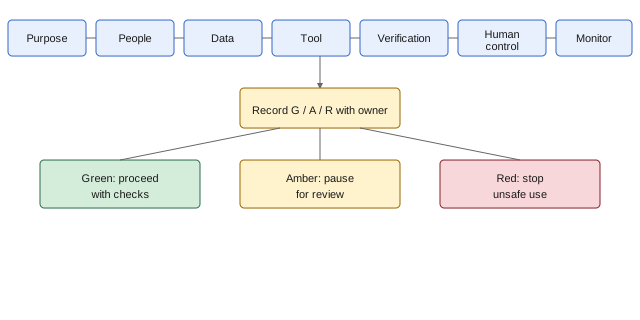
Text equivalent: Purpose, people, data, tool, verification, human control, monitoring, then record green, amber, or red with an owner. Full table in visual aids.
Seven questions before you use AI
| Step | Question | Stop if… |
|---|---|---|
| 1. Purpose | What task does AI support? What is the manual alternative? | AI adds no value or a manual method is safer |
| 2. People | Who is affected? Were affected people and local partners consulted? | A decision affecting communities was not consulted |
| 3. Data | What data will you enter? Is the tool approved for that data? | Personal or sensitive data in an unapproved tool |
| 4. Tool | Where does input go? Who can access it? Is it used for training? | Tool is unapproved or terms are unclear |
| 5. Verification | Which claims need a trusted source? How will you check? | No way to verify consequential outputs |
| 6. Human control | Who approves? Who can override? What is the remedy? | No named human accountable for the decision |
| 7. Monitoring | What is the test period? What triggers a stop? | No failure threshold or incident route |
Traffic-light decision
Green: proceed with checks
- Low-risk, already-approved use
- Only permitted public or internal data
- A named person will verify outputs before action
- Source checking is planned
Amber: pause for review
- Privacy, protection, or partner review needed
- Tool approval unclear
- Outputs affect access to aid, safety, or rights
- Consultation incomplete
Red: stop
- Prohibited input (personal or sensitive data in wrong tool)
- Unapproved tool for this data type
- High-stakes decision with no human review path
- No safe remedy if the output is wrong
Record your decision
Write one line: Decision (G/A/R), owner name, next review date.
Stop if the source is unverified or a human approval point is missing.
SAFE AI crosswalk (for training use only)
SAFE AI: Standards and Assurance for Ethical AI, Version 1.2, August 2026, built by CDAC Network, The Alan Turing Institute and Humanitarian AI Advisory, stewarded by CDAC Network, licensed CC BY 4.0, https://www.cdacnetwork.org/safe-ai.
SAFE AI tiers describe the level of governance a use needs, based on its impact. This kit’s green, amber, and red describe what a staff member should do now. They are not equivalent.
| SAFE AI tier | Definition (verbatim) |
|---|---|
| Tier 1 (Baseline) | “Internal, advisory AI use. Light-touch governance.” |
| Tier 2 (Enhanced) | “AI shapes operational decisions, with human oversight. Full assessment and assurance required.” |
| Tier 3 (High risk) | “AI directly affects people’s access to assistance, protection, or information. Community co-design and ongoing monitoring are mandatory.” |
Determine the SAFE AI tier from the use’s impact. Determine green, amber or red independently using the seven questions above. A tier does not authorize proceeding. Completing an assessment, community co-design or monitoring does not remove other approval, assurance, data-protection, human-review or remedy requirements.
This crosswalk is ParalleX’s reading for training purposes; it is not part of SAFE AI, is not endorsed by its authors, and does not replace an organizational assessment.